Tuesday, February 7, 2012

Maven and Spring WS - contract first

In this post I am going to show you how to configure and create a Web Service using Spring WS. 
Web Services developed with Spring are called contract-first Web Services because these starts with the XML Schema/WSDL contract first followed  by the Java code. In the first part of this tutorial I show you how to create the contract of the web service with XML and XSD containing request and response objects. In the second part I show you how to imlement the Web Service with Spring WS.

The most important thing when doing contract-first Web Services is to think in terms of XML. It is the XML that is sent across the wire, and you should focus on that- The fact that Java is used to implement the Web Service is an implementation detail.

The Web Service I am going to create is used to call the Google Maps services that returns an image of a locality. The reaquest contains an address or coordinates of a point in the earth or the request contains addresses or coordinates of 2 points and the response image contains the route to get from the origin to destination.

Messages
In this section I will focus on the XML messages that are sent to and from the Web Service.

As I wrote above, two of the four requests sent to the Web Service contain a coordinate (latitude, longitude) of a point in the earth or a String address to be searched by the Google Maps services, this is the declaration of these kind of objects using XSD: 

Below an example of these two XML object types: 


The next two request types are just a little different from the two above. These will contain two coordinates or two addresses to calculate the route to get from origin to destination. The last type has also another attribute called waypoints that is a List of intermediate addresses which to pass through to get to destination: 

 Next an example of these two object requests: 


The service contract based on the XSD types above is a WSDL file. It is not required that we write it by hand because Spring creates it for us when we deploy the Web Service in a Application Server. 

Web Service configuration
We can now create a new project to implements the Web Service using Java. 
I will use Maven 2 to create the initial project structure.
Once created the project structure, under the src/main/webapp folder we will find the standard web application deployment descriptor WEB-INF/web.xml which defines a Spring-WS MessageDispatcherServlet and maps all incoming requests to this servlet.

In addition to the above WEB-INF/web.xml file, we need to create the Spring configuration file WEB-INF/spring-ws-servlet.xml. This file contains all the Spring beans related to the WS such as the Web Service Implementation, the Endpoint and the contracts of the Web Service (XSD and WSDL). The name of this file is derived from the name of the attendant servlet (in this case spring-ws) with -servlet.xml appended to it.  Below we can see the configuration file: 
The first bean I have declared is a PropertyPlaceholder used to import some default values from a properties file declared in a folder on the root of the Application Server. The other bean declared are the Service Implementation that injects some default properties, by Inversion of Control, that get the values from the property placeholders from the file imported above. Follows the Endpoint declaration which injects the web service bean to a constructor argument. The last two beans represent the contract of the Web Service: XSD definition and WSDL definition that gets some properties to be injected. 

There's another configuration file that we need to create: it is the pom.xml that is the Maven configuration file used to list the dependencies of the application and information such as the build process. Follows my pom.xml: 

The dependencies needed for this project are Spring-WS and the libraries needed to test the application. There is also the maven plugin for the build process. 

The Endpoint
In Spring WS, we need to implement Endpoints to handle incoming XML requests. It is created by annotating the class with the @Endpoint annotation and it has one or more methods to handle the incoming requests each related to a Web Service method. 
Before creating the Endpoint class I have used JAX-B to create the Java classes related to the XSD types I have defined earlier for the requests and responses. 
The command to be used to generate the classes is: xjc SchemaFile.xsd.
Follows my web service endpoint: 


package com.faeddalberto.googlews.endpoint;

@Endpoint
public class GoogleServicesEndpoint {

    private GoogleServices service;
 
    @Autowired
    public GoogleServicesEndpoint(GoogleServices service) {
        this.service = service;
    }
 
    @PayloadRoot(localPart="ImageFromCoordinatesRequest", 
        namespace="http://www.faeddalberto.com/GoogleServicesContracts/types")
    public GoogleServicesResponse getImageFromCoordinates(
            ImageFromCoordinatesRequest aRequest){

        return service.getImageFromCoordinates(aRequest);
    }

    @PayloadRoot(localPart="ImageFromAddressRequest", 
        namespace="http://www.faeddalberto.com/GoogleServicesContracts/types")
    public GoogleServicesResponse getImageFromAddress(
            ImageFromAddressRequest aRequest){

        return service.getImageFromAddress(aRequest);
    }
 
    @PayloadRoot(localPart="ImageRouteFromCoordinatesRequest",
        namespace="http://www.faeddalberto.com/GoogleServicesContracts/types")
    public GoogleServicesResponse getImageRouteFromCoordinates(
            ImageRouteFromCoordinatesRequest aRequest){

        return service.getImageRouteFromCoordinates(aRequest);
    }
 
    @PayloadRoot(localPart="ImageRouteFromAddressesRequest",
        namespace="http://www.faeddalberto.com/GoogleServicesContracts/types")
    public GoogleServicesResponse getImageRouteFromAddresses(
            ImageRouteFromAddressesRequest aRequest){

        return service.getImageRouteFromAddresses(aRequest);
    }
}

This Endpoint class, annotated with the @Endpoint annotation, has a constructor to which is injected the Web Service Implementation Bean as I showed you in the Spring configuration file.
The @PayloadRoot annotations tells Spring WS that the methods are suitable for handling XML messages.
This annotation uses some attributes: the localpart attribute that defines which is the request that the method handles and the namespace attribute that defines the namespace which the request is related to. The four methods declared in the Endpoint class call the four web service methods and all four get a different request as argument that are the classes defined by the JAX-B APIs from the XSD.
All the methods return the same response that is the response of the web service: an image related to the request or an error message if any error has occurred in the web service.

Implementing the Web Service
Let's now give a look at the Java code to implement the Web Service. As usual we have the Interface that declares the service operations and the Service Implementation Bean that implements these operations.
Follows the web service interface:

package com.faeddalberto.googlews.service;

public interface GoogleServices {

    public GoogleServicesResponse getImageFromCoordinates(
ImageFromCoordinatesRequest request);
 
    public GoogleServicesResponse getImageFromAddress(
        ImageFromAddressRequest request);
 
    public GoogleServicesResponse getImageRouteFromCoordinates(
        ImageRouteFromCoordinatesRequest request);
 
    public GoogleServicesResponse getImageRouteFromAddresses(
        ImageRouteFromAddressesRequest request);

}


The Web Service Interface has four methods declared that are the methods the Web Service Implementation Bean implements:


package com.faeddalberto.googlews.service;

public class GoogleServicesImpl implements GoogleServices {

    private static final String SENSOR = "sensor=true";
    private static final String QUESTION_MARK = "?";
    private static final String AMPERSAND = "&";
    private static final String PIPE = "|"; 

    private String directionUrl;
    private String staticUrl;
 
    private String mapType;
    private String zoom;
    private String size;
    private String path;
    private String markers;
 
    private String center;
    private String origin;
    private String destination;
    private String wayPoints; 
 
    public GoogleServicesResponse getImageFromCoordinates(
            ImageFromCoordinatesRequest request) {
  
        System.out.println("getImageFromCoordinates");
  
        GoogleServicesResponse response = new GoogleServicesResponse();
  
        center += request.getLatitude() + "," + request.getLongitude();
        markers += request.getLatitude() + "," + request.getLongitude();
  
        staticUrl += QUESTION_MARK + size + AMPERSAND + zoom + 
            AMPERSAND + center + AMPERSAND + markers + AMPERSAND + 
                mapType + AMPERSAND + SENSOR;
  
        byte[] imageBytes = null;
        try {
            imageBytes = HttpUtils.loadByteArrayImageFromHttp(staticUrl);
        } catch (IOException e) {
            System.err.println("IOException " + e.getMessage());
            response.setErrorDescription("An error has 
                occurred while creating the image");
        }
  
        response.setImage(imageBytes);
  
        return response;
    }

 
    public GoogleServicesResponse getImageFromAddress(
            ImageFromAddressRequest request) {

        System.out.println("getImageFromAddress");
  
        GoogleServicesResponse response = new GoogleServicesResponse();
  
        center += request.getAddress().replace(" ", "+");
  
        staticUrl += QUESTION_MARK + size + AMPERSAND + zoom +
            AMPERSAND + center + AMPERSAND + 
                mapType + AMPERSAND + SENSOR;
  
        byte[] imageBytes = null;
        try {
            imageBytes = HttpUtils.loadByteArrayImageFromHttp(staticUrl);
        } catch (IOException e) {
            System.err.println("IOException " + e.getMessage());
            response.setErrorDescription("An error has occurred 
                while creating the image");
        }
  
        response.setImage(imageBytes);
  
        return response;
    }

 
    public GoogleServicesResponse getImageRouteFromCoordinates(
            ImageRouteFromCoordinatesRequest request) {

        System.out.println("getImageRouteFromCoordinates");
        GoogleServicesResponse response = new GoogleServicesResponse();
  
        origin += request.getLatitudeOrg() + 
                        "," + request.getLongitudeOrg();
        destination += request.getLatitudeDst() + 
                        "," + request.getLongitudeDst();
    
        directionUrl += QUESTION_MARK + origin + AMPERSAND 
            + destination + AMPERSAND + SENSOR;
  
        try {
            response.setImage(getImageRoute());
        } catch (MalformedURLException e) {
            System.err.println("MalformedURLException " + e.getMessage());
            response.setErrorDescription("An error has occurred 
                while processing the request");
        } catch (IOException e) {
            System.err.println("IOException " + e.getMessage());
            response.setErrorDescription("An error has occurred 
                while creating the image containing the route");
        }
  
        return response;
    }

 
    public GoogleServicesResponse getImageRouteFromAddresses(
            ImageRouteFromAddressesRequest request) {

        GoogleServicesResponse response = new GoogleServicesResponse();
  
        System.out.println("getImageRouteFromAddresses");
  
        origin += request.getAddressOrg();
        destination += request.getAddressDst();
  
        for(int i = 0; i < request.getWaypoints().size(); i++) {
            if (i != 0) wayPoints += PIPE; 
            wayPoints += request.getWaypoints().get(i).replace(" ", "+");
        }
  
        directionUrl += QUESTION_MARK + origin + AMPERSAND + 
            destination + AMPERSAND + wayPoints + AMPERSAND + SENSOR;
    
        try {
            response.setImage(getImageRoute());
        } catch (MalformedURLException e) {
            System.err.println("MalformedURLException " + e.getMessage());
            response.setErrorDescription("An error has occurred
                    while processing the request");
        } catch (IOException e) {
            System.err.println("IOException " + e.getMessage());
            response.setErrorDescription("An error has occurred 
                    while creating the image containing the route");
        }
  
        return response;
    }
 
 
    private byte[] getImageRoute() 
            throws MalformedURLException, IOException {
  
        System.out.println(directionUrl);

        String xmlString = 
               HttpUtils.loadStringXmlFromHttp(directionUrl);  
  
        Document xmlDocumentResult = 
               XmlUtils.createXmlDocumentFromString(xmlString);
  
        String routeCoord = 
               XmlUtils.getRouteCoordinatesFromXml(xmlDocumentResult);
  
        staticUrl += QUESTION_MARK + size + AMPERSAND 
                  + path + routeCoord + AMPERSAND + SENSOR;
  
        byte[] imageBytes = null;
  
        imageBytes = HttpUtils.loadByteArrayImageFromHttp(staticUrl);

        return imageBytes;
    }

 
             /* GETTERS & SETTERS */
 
    public String getDirectionUrl() {
        return directionUrl;
    }


    public void setDirectionUrl(String directionUrl) {
        this.directionUrl = directionUrl;
    }


    public String getStaticUrl() {
        return staticUrl;
    }


    public void setStaticUrl(String staticUrl) {
        this.staticUrl = staticUrl;
    }


    public String getMapType() {
        return mapType;
    }


    public void setMapType(String mapType) {
        this.mapType = mapType;
    }


    public String getZoom() {
        return zoom;
    }


    public void setZoom(String zoom) {
        this.zoom = zoom;
    }


    public String getSize() {
        return size;
    }


    public void setSize(String size) {
        this.size = size;
    }


    public String getPath() {
        return path;
    }


    public void setPath(String path) {
        this.path = path;
    }


    public String getMarkers() {
        return markers;
    }


    public void setMarkers(String markers) {
        this.markers = markers;
    }


    public String getCenter() {
        return center;
    }


    public void setCenter(String center) {
        this.center = center;
    }


    public String getOrigin() {
        return origin;
    }


    public void setOrigin(String origin) {
        this.origin = origin;
    }


    public String getDestination() {
        return destination;
    }


    public void setDestination(String destination) {
        this.destination = destination;
    }


    public String getWayPoints() {
        return wayPoints;
    }


    public void setWayPoints(String wayPoints) {
        this.wayPoints = wayPoints;
    }
}


The Web Service Implementation bean has some constants and some instance variables with default values injected by the Spring context configuration file.
The implemented methods, after reading the request values make use of two classes, HttpUtils and XmlUtils, that I've implemented to call the Google Services using the HttpConnection, Stream, and XML related APIs to parse the response of the Google services.
These are the two utils classes that I am talking about:


The util class related to Http:
package com.faeddalberto.googlews.utils;

public class HttpUtils {

    public static String loadStringXmlFromHttp(
            String urlString) throws IOException, MalformedURLException {
  
        URL url = null;
        BufferedReader reader = null;
        StringBuilder stringBuilder = null;
  
        try {
            url = new URL(urlString);
 
            HttpURLConnection connection = (HttpURLConnection) url.openConnection();
        
            // just want to do an HTTP GET here
            connection.setRequestMethod("GET");
            connection.setDoOutput(true);
            connection.connect();
   
            // read the output from the server
            reader = new BufferedReader(
                 new InputStreamReader(connection.getInputStream()));
            stringBuilder = new StringBuilder();
      
            String line = null;
            while ((line = reader.readLine()) != null) {
                stringBuilder.append(line + "\n");
                System.out.println(line);
            }
      
        } finally {
        
            // close the reader; this can throw an exception too, so
            // wrap it in another try/catch block.
            if (reader != null)   {
                try {
                    reader.close();
                }  catch (IOException ioe) {
                    System.err.println("IOException " + ioe.getMessage());
                }
            }
        }
  
        return stringBuilder.toString();
    }
 
    public static byte[] loadByteArrayImageFromHttp(String urlString) throws IOException { 

        URL url = new URL(urlString); //Get an input stream for reading 

        HttpURLConnection hc = null;
        hc = (HttpURLConnection) url.openConnection();
        hc.setRequestMethod("GET");
        hc.setDoOutput(true);
        hc.connect();

        InputStream in = new BufferedInputStream(hc.getInputStream());
  
        try {
            ByteArrayOutputStream bout = new ByteArrayOutputStream(10000);
            int b;
            while ((b = in.read()) != -1) {
                bout.write(b);
            }
            
            return bout.toByteArray();
        } finally {
            in.close();
        }
    }

}


The util class related to XML:
package com.faeddalberto.googlews.utils;

public class XmlUtils {

    public static Document createXmlDocumentFromString(String result) {
  
        DocumentBuilderFactory factory = DocumentBuilderFactory.newInstance();
        InputSource source = new InputSource(new StringReader(result));
  
        Document document = null;
  
        try {
            document = factory.newDocumentBuilder().parse(source);
        } catch (SAXException e) {
            System.err.println("SAXException " + e.getMessage());
        } catch (IOException e) {
            System.err.println("IOException " + e.getMessage());
        } catch (ParserConfigurationException e) {
            System.err.println("ParserConfigurationException " + e.getMessage());
        }
   
        return document;
    }
 
    
    public static String getRouteCoordinatesFromXml(Document xmlDocumentResult) {
  
        String lat = null, lng = null, route = ""; 
  
        NodeList nList = xmlDocumentResult.getElementsByTagName("step");
  
        for (int temp = 0; temp < nList.getLength(); temp++) {
            Node nNode = nList.item(temp);
            if (nNode.getNodeType() == Node.ELEMENT_NODE) {

                Element eElement = (Element) nNode;

                System.out.println("LAT: " + getTagValue("lat", eElement));
                System.out.println("LONG: " + getTagValue("lng", eElement));
    
                lat = getTagValue("lat", eElement);
                lng = getTagValue("lng", eElement);
            }
   
            route += "|" + lat + "," + lng;
        }
  
        return route;
    }
 
    private static String getTagValue(String sTag, Element eElement) {
  
        NodeList nlList = 
             eElement.getElementsByTagName(sTag).item(0).getChildNodes();
   
        Node nValue = (Node) nlList.item(0);
  
        return nValue.getNodeValue();
    }
 
}


Next picture shows the browser with the resulting WSDL of the service calling http://127.0.0.1:8080/googlews/googleservices.wsdl. In the picture below we can only see the first part of the WSDL, containing the types associated with the service: 


The next thing I want to show you are the tests of the different web service operations and the images resulting from the calls. I have used jUnit to test the service methods:

1st method: Image from coordinates:
@Test
@DirtiesContext
public void getImageFromCoordinatesTest() throws IOException {
  
    GoogleServices services = 
               (GoogleServices) applicationContext.getBean("services");
  
    ImageFromCoordinatesRequest request = new ImageFromCoordinatesRequest();
    request.setLatitude(40.711614);
    request.setLongitude(-74.012318);
  
    String fileName = "lat " + request.getLatitude() + 
                      " lon " + request.getLongitude();
  
    GoogleServicesResponse response = services.getImageFromCoordinates(request); 
  
    Assert.assertNotNull(response.getImage());
  
    if (response.getImage() != null)
         createImageOnDisk(response.getImage(), fileName); 
    else System.out.println(response.getErrorDescription());
}


2nd method: Image from address:
@Test
@DirtiesContext
public void getImageFromAddressTest() throws IOException {
  
    GoogleServices services = 
         (GoogleServices) applicationContext.getBean("services");
  
    ImageFromAddressRequest request = new ImageFromAddressRequest();
    request.setAddress("Piccadilly Circus, London, UK");
  
    String fileName = request.getAddress().replace(',', ' ');
  
    GoogleServicesResponse response = services.getImageFromAddress(request);
  
    Assert.assertNotNull(response.getImage());
  
    if (response.getImage() != null) 
         createImageOnDisk(response.getImage(), fileName); 
    else System.out.println(response.getErrorDescription());
}


3rd method: Image route from coordinates origin and destination:
@Test
@DirtiesContext
public void getImageRouteFromCoordinatesTest() throws IOException {
 
    GoogleServices services = 
          (GoogleServices) applicationContext.getBean("services");
  
    ImageRouteFromCoordinatesRequest request =
            new ImageRouteFromCoordinatesRequest();
    request.setLatitudeOrg(37.4219720);
    request.setLongitudeOrg(-122.0841430);
    request.setLatitudeDst(37.4163228);
    request.setLongitudeDst(-122.0250403);
    
    String fileName = "latOrg " + request.getLatitudeOrg() + 
                      " lonOrg " + request.getLongitudeOrg() + 
                      "latDst " + request.getLatitudeDst() + 
                      " lonDst " + request.getLongitudeDst();
  
    GoogleServicesResponse response =
         services.getImageRouteFromCoordinates(request);
  
    Assert.assertNotNull(response.getImage());
  
    if (response.getImage() != null) 
        createImageOnDisk(response.getImage(), fileName); 
    else System.out.println(response.getErrorDescription());  
}


4th method: Image route from addresses origin and destination,  and eventually some waypoints:
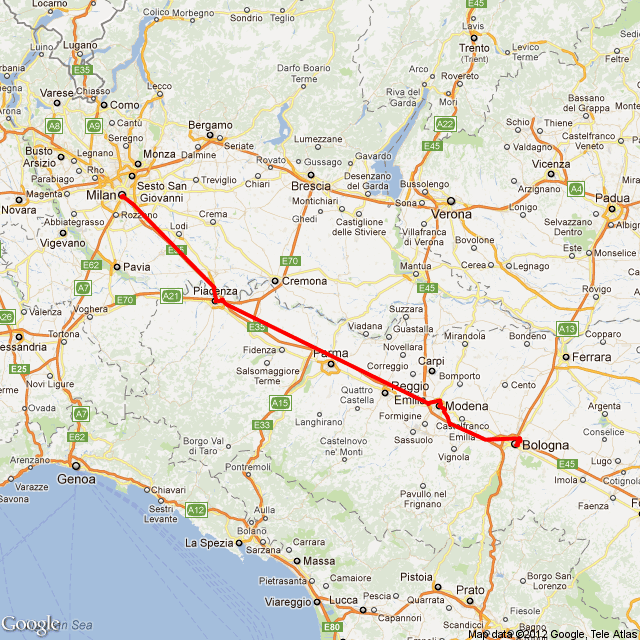
@Test
@DirtiesContext
public void getImageRouteFromAddressesTest() throws IOException {
 
    GoogleServices services =
               (GoogleServices) applicationContext.getBean("services");
  
    ImageRouteFromAddressesRequest request =
          new ImageRouteFromAddressesRequest();
    request.setAddressOrg("Milano,MI");
    request.setAddressDst("Bologna,BO");
  
    List wayPoints = new ArrayList();
    wayPoints.add("Piacenza, PC");
    wayPoints.add("Modena, MO");
    request.setWaypoints(wayPoints);
  
    String fileName = request.getAddressOrg().replace(',', ' ') 
            + " - " + request.getAddressDst().replace(',', ' ');
  
    GoogleServicesResponse response =
               services.getImageRouteFromAddresses(request);
  
    Assert.assertNotNull(response.getImage());
  
    if (response.getImage() != null) 
        createImageOnDisk(response.getImage(), fileName); 
    else System.out.println(response.getErrorDescription());
}

Saturday, December 3, 2011

RESTful Web Services and XML Parsing


In this post I describe the basic techniquies for implementing SOA components using the REST paradigm. REST stands for REpresentational State Transfer.
REST and SOAP are quite different. SOAP is a messaging protocol, whereas REST is a style of software architecture for distributed hypermedia systems; that is, systems in which text, graphics, audio, and other media are stored across a network and interconnected
through hyperlinks. A resource in the RESTful sense is anything that has an URI; that is, an identifier that satisfies formatting requirements. The formatting requirements are what make URIs uniform. Recall, too, that URI stands for Uniform Resource Identifier; hence, the notions of URI and resource are intertwined. In practice, a resource is an informational item that has hyperlinks to it. In the Web, HTTP is both a transport protocol and a messaging system because HTTP requests and responses are messages. The payloads of HTTP messages can be typed using the MIME type system, and HTTP provides response status codes to inform the requester about whether a request succeeded and, if not, why.
In a RESTful request targeted at a resource, the resource itself remains on the service machine. The requester typically receives a representation of the resource if the request succeeds. It is the representation that transfers from the service machine to the requester machine.
RESTful web services require not just resources to represent but also client-invoked operations on such resources. RESTful services are stateless; each request from client to server must contain all the information necessary to understand the request, and cannot take
advantage of any stored context on the server.
At the core of the RESTful approach is the insight that HTTP, despite the occurrence of Transport in its name, is an API and not simply a transport protocol. HTTP has its well-known verbs, officially known as methods. In the REST model, the only verbs allowed are GET, POST, PUT, and DELETE.

HTTP verb                Meaning in CRUD terms
POST                     Create a new resource from the request data
GET                       Read a resource
PUT                       Update a resource from the request data
DELETE                  Delete a resource


HTTP also has standard response codes, such as 404 to signal that the requested resource
could not be found, and 200 to signal that the request was handled successfully.
In short, HTTP provides request verbs and MIME types for client requests and status
codes (and MIME types) for service responses.

A key guiding principle of the RESTful style is to respect the original meanings of the HTTP verbs. In particular, any GET request should be side effect-free because a GET is a read rather than a create, update, or delete operation.
The RESTful approach tries to simplify matters by taking what HTTP, with its MIME type system, already offers: built-in CRUD operations, uniformly identifiable resources, and typed representations that can capture a resource’s state. REST as a design philosophy tries to isolate application complexity at the endpoints, that is, at the client and at the service.
A service may require lots of logic and computation to maintain resources and to generate
adequate representation of resources—for instance, large and subtly formatted XML documents—and a client may require significant XML processing to extract the desired information from the XML representations transferred from the service to the client. Yet the RESTful approach keeps the complexity out of the transport level, as a resource representation is transferred to the client as the body of an HTTP response message. 


XML and @WebServiceProvider

The @WebServiceProvider signals that the exchanged messages will be XML documents of some type, a notion captured in the phrase raw XML. In a RESTful request/response service, the service response is raw XML but the incoming request might not be XML at all. A GET request does not have a body; hence,
arguments sent as part of the request occur as attributes in the query string, a collection of key/value pairs. Here is a sample:

http://127.0.0.1:8080/movies?title=Constantine&year=2007

The question mark (?) begins the query string, and the attributes are key/value pairs separated by ampersands (&). The order of attributes in the query string is arbitrary; for instance, the year attribute could occur first in the query string without changing the meaning of the request.
By contrast, a POST request does have a body, which can be an arbitrary XML document instead of a SOAP envelope.

The structure of the XML is critical for defining how applications interact with each other in an SOA-style Web Services infrastructure.
It is a fundamental principle of systems integration design that applications must interact across well-defined interfaces.In my example that comes next you can see how XML Schema can be used to define the structure of a Movie. In this manner, any system that needs to insert a new Movie can map whatever form
their data is in to the movies.xsd schema and send it as a message to the movies service. The following two concepts provide the foundation for SOA-style integration using Web Services:

1. XML documents are used to exchange messages between applications.
2. XML Schema documents define the application interfaces.

Point (2) tells you that, even when using RESTful services (without WSDL and SOAP), the schema of the XML documents being exchanged between SOA components can be used to define interfaces for the services. Unfortunately, this use of XML Schema to formalize interfaces for RESTful services is not universally accepted as part of the REST framework.

In my RESTful service I followed an XML Schema that defines the types allowed to be exchanged from client and service. When developing SOA systems based on XML, it is important to employ XML Schema to validate documents. Just as a relational database management system allows you to impose constraints on data values and format within the database schema, so XML Schema can be used to validate the integrity of XML documents. XML Schema is important for maintaining data quality and integrity when sharing information among multiple systems. Next picture shows the XML Schema to exchange data between client and service:


As you can see, the XML Schema defines three complexType elements: actor that I than use in a list to compose the cast of a movie, movie that defines the stored informations about a movie and movies that is the global type containing a list of movies.

Following this Schema elements I created the associated Java classes: the Movie and the Actor classes:

package com.faeddalberto.restfulmovies.movie.types;

import java.util.List;

public class Movie {
 
    private String title;
    private String director;
    private String genre;
    private List actors;
    private Integer year;
 
 
    public String getTitle() {
        return title;
    }
    public void setTitle(String title) {
        this.title = title;
    }
    public String getDirector() {
        return director;
    }
    public void setDirector(String director) {
        this.director = director;
    }
    public String getGenre() {
        return genre;
    }
    public void setGenre(String genre) {
        this.genre = genre;
    }
        public List getActors() {
        return actors;
    }
    public void setActors(List actors) {
        this.actors = actors;
    }
    public Integer getYear() {
        return year;
    }
    public void setYear(Integer year) {
        this.year = year;
    }
 
}


package com.faeddalberto.restfulmovies.movie.types;

public class Actor {
 
    private String name;
    private String surname;
    private String nationality;
 
 
    public String getName() {
        return name;
    }
    public void setName(String name) {
        this.name = name;
    }
    public String getSurname() {
        return surname;
    }
    public void setSurname(String surname) {
        this.surname = surname;
    }
    public String getNationality() {
        return nationality;
    }
    public void setNationality(String nationality) {
        this.nationality = nationality;
    }
}


Both are simple Java POJO classes containing instance variables and getter & setter methods. The Movie class has a List of Actors and some other simple variables related to a Movie and the Actor class has some simple instance variables related to Actor.

A service annotated with @WebServiceProvider implements the Provider interface, which requires that the invoke method:

public Source invoke(Source request)

be defined. This method expects a Source of bytes (for instance, the bytes in an XML document that represents the service request) and returns a Source of bytes (the bytes in the XML response). When a request arrives, the infrastructure dispatches the request to the invoke method, which handles the request in some service-appropriate way.

The next picture shows an example of xml containing movies informattions belonging to the elements defined in the XML Schema that I showed you previously:


Note the use of namespaces in this example. The Movies element is from the namespace http://faeddalberto.com/movie/schemas. When developing SOA systems with XML, it is important to
use namespaces, because documents originating from different systems may use the same tags (e.g., “movie”), and it is important to interpret the tag in the proper context.

A RESTful Movies Service
The RESTful service that I am going to show you honors GET and POST requests.
The service is a container of movies informations stored in the XML file that I showed you previously.
In the next pictures I'll show you the code divided in different pieces, from the class declaration and annotations, the invoke method, the methods that serve the client requests, methods used to create the responses to the clients, the XML parsing. Than I'll show you the client used to query the service and how to deploy the service in a Application Server.

Let's start with the web service class declaration:

@WebServiceProvider
@ServiceMode(value = javax.xml.ws.Service.Mode.MESSAGE)
@BindingType(value = HTTPBinding.HTTP_BINDING)
public class RESTfulMoviesService implements Provider {
 
    @Resource
    WebServiceContext wsCtx;
 
    private static final String fileName = "movies.xml";
 
    private Map moviesMap;
    private List movies;
 
    private byte[] moviesBytes;
 
    public RESTfulMoviesService() {
        readMoviesFromFile();  // read the raw file bytes from movies.xml
        deserialize();   // deserialize to a List
    }

The class below is a WebServiceProvider rather than the more usual SOAP-based WebService. The service implements the generic Provider interface rather than a customized SEI with designated @WebMethods. There are two ServiceModes: PAYLOAD, the default, signals that the service wants access only to the underlying message payload (e.g., the body of an HTTP POST request); MESSAGE signals that the service wants access to entire message (e.g., the HTTP headers and body).
The HTTP_BINDING for the Binding Type opposed to the SOAP_BINDING used for SOAP web services to annunce that the web service deals with raw XML instead of SOAP over HTTP.

We have also the Injection of the resource WebServiceContext that is useful to extract the message context of the user request.
The other instance variables are useful to load and store the Movies from the XML document during the deserialization process that starts during web service initialization. Next picture shows the methods involved in the deserialization and intialization process:

private void deserialize() {
  
    URI nsURI = null;
  
    try {
        nsURI = new URI("fa:movies");
    }
    catch(URISyntaxException e) { System.err.println(e); }

    Source source = new StreamSource(new ByteArrayInputStream(moviesBytes));
  
    movies = new MoviesParser().parseMovies(source, nsURI.toString());
  
    moviesMap = Collections.synchronizedMap(new HashMap());
  
    for(Movie movie: movies) 
        moviesMap.put(movie.getTitle(), movie);
}
 
private void readMoviesFromFile() {
    try {
        String path = getFilePath();
        int len = (int) new File(path).length();
        moviesBytes = new byte[len];
        new FileInputStream(path).read(moviesBytes);
    } catch(IOException e) {
        System.err.println("IOException " + e);
    }
}
 
private String getFilePath() {
    String cwd = System.getProperty("user.dir");
    String sep = System.getProperty("file.separator");
    return "resources" + sep + fileName;
}

The method readMoviesFromFile() loads the file and reads its input stream to be stored in the byte array moviesBytes. In the deserialize() method we create a Source object containing the previously loaded byte array of movies. Calling the MovieParser class I then parse the Source object and create the List and Map storing the movies loaded from file. I'll show you later the MovieParser class used to read the movies informations. Let's now start giving a view on how the invoke method looks like:

public Source invoke(Source request) {
 
    if(wsCtx == null) 
        throw new RuntimeException("Error injecting web service context");
  
    MessageContext msgCtx = wsCtx.getMessageContext();
 
    String httpVerb = (String) msgCtx.get(MessageContext.HTTP_REQUEST_METHOD);
 
    httpVerb = httpVerb.trim().toUpperCase();

    if(httpVerb.equals("GET"))   return doGet(msgCtx);
    else if(httpVerb.equals("POST"))  return doPost(request);
    else throw new HTTPException(405);  //method not allowed
  
}
This method handles incoming requests and generates the response. I get the MessageContext to find the request method (GET or POST) and then call the associate method to serve the client request.
Let's see how I handle the GET request:

private Source doGet(MessageContext msgCtx) {
  
    String queryString = (String) msgCtx.get(MessageContext.QUERY_STRING);
  
    // get all DVDs
    if(queryString == null) 
        return new StreamSource(new ByteArrayInputStream(moviesBytes));
  
    else {
        String title = getValueFromQs("title", queryString);
  
        if(!moviesMap.containsKey(title))
            throw new HTTPException(404);  // movie not found
   
        Movie movie = moviesMap.get(title);
   
        // generate XML and return
        ByteArrayInputStream is = new ByteArrayInputStream(responseXMLMovies(movie));
   
       return new StreamSource(is);
    }  
}

private byte[] responseXMLMovies(Movie movie) {
  
    Document doc = new MoviesParser().createXMLMovies(movie);
  
    return encodeToStream(doc);
}
 
private byte[] encodeToStream(Document doc) {
  
    Source source = new DOMSource(doc);
    ByteArrayOutputStream out = null;
  
    try {
        out = new ByteArrayOutputStream();
 
        Result result = new StreamResult(out);
        TransformerFactory factory = TransformerFactory.newInstance();
   
        Transformer transformer = factory.newTransformer();
        transformer.transform(source, result);
   
    } catch (TransformerConfigurationException e) {
        System.err.println("TransformerConfigurationException " + e);
    } catch (TransformerException e) {
        System.err.println("TransformerException " + e);
    }
    
    return out.toByteArray();
  
}

private String getValueFromQs(String attribute, String queryString) {
    String[] parts = queryString.split("=");
  
    if(!parts[0].equalsIgnoreCase(attribute))
        throw new HTTPException(400);  // bad request
  
    return parts[1].trim();
}


The first method in the picture is the doGet which I pass the MessageContext object to get the query string. If no query string has been used to query the web service, I do return the entire XML file content that I previously stored in the byte array after creating a StreamSource from it.
If a query string exists I get the value of the "title" parameter, using the getValueFromQs() method, that represents the Movie title. Once had its value, I check if that title exist on the stored Map:
  • if it does not exist I do throw an HTTPException(404): movie not found. 
  • if it exists, I get the stored Movie informations from the Map and call the responseXMLMovies() method which uses the MovieParser class to create an XML document and returns it as DOMSource, created by the encodeToStream() method, to be sent as response to the client.
Let's now see how the POST request from the client will be handled by my service:

private Source doPost(Source request) {
    if(request == null) throw new HTTPException(400); // bad request
  
    URI nsURI = null;
  
    try {
 nsURI = new URI("fa:movies");
    }
    catch(URISyntaxException e) { System.err.println(e); }
  
    List newMovie = new ArrayList();
    newMovie = new MoviesParser().parseMovies(request, nsURI.toString());
  
    if(moviesMap.containsKey(newMovie.get(0).getTitle()))
        throw new HTTPException(400); // bad request
  
    // add the new movie to the in-memory map and save the list into the file
    movies.add(newMovie.get(0));
  
    moviesMap.put(newMovie.get(0).getTitle(), newMovie.get(0));
  
    serialize();
  
    ByteArrayInputStream is = new ByteArrayInputStream(
            responseConfirmation("Movie - " + newMovie.get(0).getTitle() + " - created"));
  
    return new StreamSource(is);
}
 
private byte[] responseConfirmation(String msg) {
 
    Document doc = new MoviesParser().createXMLConfirmation(msg);
  
    return encodeToStream(doc);
}
 
private byte[] encodeToStream(Document doc) {
  
    Source source = new DOMSource(doc);
    ByteArrayOutputStream out = null;
  
    try {
        out = new ByteArrayOutputStream();

        Result result = new StreamResult(out);
        TransformerFactory factory = TransformerFactory.newInstance();
   
        Transformer transformer = factory.newTransformer();
        transformer.transform(source, result);
   
    } catch (TransformerConfigurationException e) {
        System.err.println("TransformerConfigurationException " + e);
    } catch (TransformerException e) {
        System.err.println("TransformerException " + e);
    }
    return out.toByteArray();
  
}

private void serialize() {
  
    Document doc = new MoviesParser().createXMLMovies(movies);
  
    try {
        Source dom = new DOMSource(doc);
   
        String path = getFilePath();
        File file = new File(path);
   
        Result result = new StreamResult(file);
   
        //write the DOM document to the file
        Transformer xmlSaver = TransformerFactory.newInstance().newTransformer();
        xmlSaver.transform(dom, result);
  
    }catch (TransformerConfigurationException e) {
        System.err.println("TransformerConfigurationException " + e);
    } catch (TransformerException e) {
        System.err.println("TransformerException " + e);
    }
  
}

The first method in the picture above is the doPost which I pass the Source parameter because the HTTP POST request has a body containing the user request to be treated as a Create. Inside the body request I have a new Movie to be saved into the XML file therefore I need to parse the Source object to get it.
Before parsing the Source object I create a Namespace URI which the movies elements belong to.
Once parsed I create a List of Movies containing the Movie passed by the client and add it into the Map before serializing all its content into the movies.xml file. Once the serialization process is done I return a confirmation to the client as a confirmation creating a new DOMSource containing only a confirmation string tag with the inserted Movie title. To create this source I do use the same encodeToStream() method used for the GET request.

Parsing XML

Now that I showed you how to handle GET and POST requests, I want to show you the class MovieParser used to parse the XML file and load Movie informations and to create DOM Document to be used as responses to be sent to the clients. I used JAX-P APIs to read and write XML documents.
The first code snapshot that I show you is used to parse and get Movie informations from an XML document: 


public List parseMovies(Source result, String uri) {
    DOMResult domResult = new DOMResult();

    List movies = new ArrayList();
  
    String movieTitle = null, movieDirector = null, movieGenre = null,
        actorName = null, actorSurname = null, actorNationality = null;
    Double movieYear = null;
  
    try {
        Transformer trans = TransformerFactory.newInstance().newTransformer();
        trans.transform(result, domResult);
  
        XPathFactory xpf = XPathFactory.newInstance();
        XPath xp = xpf.newXPath();
   
        xp.setNamespaceContext(new NSResolver("fa", uri));
        NodeList resultList = (NodeList)xp.evaluate("movies/movie", 
                                    domResult.getNode(), XPathConstants.NODESET);
   
        int len = resultList.getLength();
        for(int i = 0; i < len; i++) {
            Movie movie = new Movie();
            List actors = new ArrayList();
    
            Node movieNode = resultList.item(i);
    
            if (movieNode.getNodeType() == Node.ELEMENT_NODE) {
           
                Element movieElmnt = (Element) movieNode;
            
                movieTitle = getNodeValue(movieElmnt, "title");
                movieDirector = getNodeValue(movieElmnt, "director");
                movieGenre = getNodeValue(movieElmnt, "genre");
      
                NodeList actorsList = movieElmnt.getElementsByTagName("actor");
    
                for(int j = 0; j < actorsList.getLength(); j++) {
                    Node actorsNode = actorsList.item(j);
                    Actor actor = new Actor();
                    if (movieNode.getNodeType() == Node.ELEMENT_NODE) {
             
                        Element actorElmnt = (Element) actorsNode;
        
                        actorName = getNodeValue(actorElmnt, "name");
                        actorSurname = getNodeValue(actorElmnt, "surname");
                        actorNationality = getNodeValue(actorElmnt, "nationality");
          
                        actor.setName(actorName); 
                        actor.setSurname(actorSurname); 
                        actor.setNationality(actorNationality);
          
                        actors.add(actor);
                   }
               }

               movieYear = Double.parseDouble(getNodeValue(movieElmnt, "year"));
    }       
        } 
    
        movie.setTitle(movieTitle); 
        movie.setDirector(movieDirector); 
        movie.setGenre(movieGenre); 
        movie.setActors(actors); 
        movie.setYear(movieYear.intValue());
    
        movies.add(movie); 
    }
   
    }catch(TransformerConfigurationException e) {
        System.err.println("TransformerConfigurationException " + e.getMessage());
    }catch(TransformerException e) {
        System.err.println("TransformerException " + e.getMessage());
    }catch(XPathExpressionException e) {
        System.err.println("XPathExpressionException " + e.getMessage());
    }  
  
    return movies;
} 

private String getNodeValue(Element elem, String nodeName) {
    NodeList nodeElmntLst = elem.getElementsByTagName(nodeName);
    Element nodeElmnt = (Element) nodeElmntLst.item(0);
    NodeList nodeLs = nodeElmnt.getChildNodes();
    String nodeValue = ((Node) nodeLs.item(0)).getNodeValue();

    return nodeValue;
}


After transforming a Source object to a DOMResult object using the Transformation APIs from JAX-P I create an XPath object to read informations from the DOMResult just created.
Using the xpath evaluate() method I get a list of movies from the document treating those as a NodeList through which I iterate to get the informations of each movie found.
Inside the cycle I iterate over the NodeList and get the value for every node using the getNodeValue() method which I pass the name of the Element I want to get the value of and the Element itself.
Iterating over the NodeList I also get another NodelList which is the one having movie Actors informations. This method returns a List of movies containing all the movies informations read from the file included Actors informations for every movie read.

Next task that I am going to show you is how to create a DOM Document from a List of Movies.
This method is used to create a response to be sent to the clients that require informations of a Movie or all the movies stored in the XML file in a GET request:
  
public Document createXMLMovies(List movies) {
  
    Element rootElement = null;
    Document xmlDoc = null;
    try {
        DocumentBuilderFactory factory = DocumentBuilderFactory.newInstance();
        DocumentBuilder builder = factory.newDocumentBuilder();
        DOMImplementation impl = builder.getDOMImplementation();
  
        xmlDoc = impl.createDocument(null, "movies", null);
   
        rootElement = xmlDoc.getDocumentElement();
   
        for(int j = 0; j < movies.size(); j++) {
   
            Element movieElem = xmlDoc.createElementNS(null, "movie");
    
            Element title = createElementWithValue( xmlDoc, 
                         "title", movies.get(j).getTitle()); 
            
            Element director = createElementWithValue( xmlDoc, 
                         "director", movies.get(j).getDirector());
            
            Element genre = createElementWithValue( xmlDoc, 
                         "genre", movies.get(j).getGenre());
            
            Element year = createElementWithValue( xmlDoc, 
                         "year", ""+movies.get(j).getYear());
    
            Element movieActors = xmlDoc.createElementNS(null, "actors");
    
            for (int i = 0; i < movies.get(j).getActors().size(); i++) {

                Element actor = xmlDoc.createElementNS(null, "actor");

                Element name = createElementWithValue( xmlDoc, "name", 
                              movies.get(j).getActors().get(i).getName()); 

                Element surname = createElementWithValue( xmlDoc, "surname", 
                              movies.get(j).getActors().get(i).getSurname());

                Element nationality = createElementWithValue( xmlDoc, "nationality";
              
                movies.get(j).getActors().get(i).getNationality());

                actor = createElement(actor, name, surname, nationality);

                movieActors.appendChild(actor);
            } 
    
            movieElem = createElement(movieElem, title, 
                        director, genre, movieActors, year);

            rootElement.appendChild(movieElem);
        } 
   
    } catch (ParserConfigurationException e) {
        System.err.println("ParserConfigurationException " + e.getMessage());
    }
 
    //printDomDoc(xmlDoc);
  
    return xmlDoc;
}

private Node createNode(Document xmlDoc, String name, String value) {
  
    Node node = xmlDoc.createTextNode(name); 
    node.setNodeValue(value);
    return node;
}
 
private Element createElementWithValue(Document xmlDoc, String name, String value) {
 
    Element elem = xmlDoc.createElementNS(null, name);
    elem.appendChild(createNode(xmlDoc, name, value));
  
    return elem;
}
 
private Element createElement(Element elem, Node... nodes) {
  
    for (Node node: nodes) {
        elem.appendChild(node);
    }
  
    return elem;
}


In the first method I create a new DOM document with a "movies" element as root and with a for interation over the movies List passed as argument I create the elements to add as root element children, the "movie" elements.
The other methods are all utility methods that I use to create the elements and set a value on those using the DOM APIs.  After having created all the elements to put into the file I use the appendChild() method to append every movie to the root element of the created document.

The Dispatch Client

Now that I showed you how to parse the XML document and read informations from it, I show you the client that I use to query the web service. It uses the counterpart of the Provider interface: the Dispatcher that has at its own time a invoke method used to manage the request to be sent to the service:


public class DispatchMoviesClient {

    private List movies = new ArrayList();
 
    public static void main(String[] args) {
        new DispatchMoviesClient().setupAndTest();
    }

    private void setupAndTest() {
        // create identifying name for service and port
        URI nsURI = null;
  
        try {
            nsURI = new URI("fa:movies");
        }
        catch(URISyntaxException e) { System.err.println(e); }
  
        QName serviceName = new QName("dvdService", nsURI.toString());
        QName portName = new QName("dvdPort", nsURI.toString());
        String endpoint = "http://127.0.0.1:8080/movies?title=Cloverfield";
  
        // Now create a service dispatcher
        Service service = Service.create(serviceName);
        service.addPort(portName, HTTPBinding.HTTP_BINDING, endpoint);
        Dispatch dispatch = service.createDispatch(portName, 
                     Source.class, Service.Mode.PAYLOAD);

        // send some requests:
  
        // GET request to view the dvd list
        invoke(dispatch, "GET", nsURI.toString(), null);
  
        // POST request to insert a new movie
        invoke(dispatch, "POST", nsURI.toString(), createMovie());
    }

    private void invoke(Dispatch dispatch, String verb,
        String uri, Movie data) {
  
        Map requestContext = dispatch.getRequestContext();
  
        requestContext.put(MessageContext.HTTP_REQUEST_METHOD, verb);

        Source source = null;
  
        if(data != null) {
            source = makeMovieStreamSource(data);
        }
    
        // invoke
        Source result = dispatch.invoke(source);
  
        if(data == null) {
   
            movies = new MoviesParser().parseMovies(result, uri);
   
            displayGETResult();
        }
  
        else {
            System.out.println("\nNew movie request: ");
            displayPOSTResult(result, uri);
        }
    }

    private Source makeMovieStreamSource(Movie movie) {

        Document doc = new MoviesParser().createXMLMovies(movie);
        Source source = new DOMSource(doc);
  
        return source;
    }

    private void displayGETResult() {
        if(movies.size() != 0)
            System.out.println("Movies: ");
  
        for (int i = 0; i < movies.size(); i++) {
            System.out.println("Movie " + i);
            System.out.println("\tTitle: " + movies.get(i).getTitle() + 
                 ", Director: " + movies.get(i).getDirector() + 
                 ", Genre: " + movies.get(i).getGenre() + 
                 ", Year: " + movies.get(i).getYear());
   
            System.out.println(" Actors: ");
            for(int j = 0; j < movies.get(i).getActors().size(); j++) {
                System.out.println("\tName: " + movies.get(i).getActors().get(j).getName()
                 + ", Surname " + movies.get(i).getActors().get(j).getSurname()
                 + ", Nationality: " + movies.get(i).getActors().get(j).getNationality());
            }
        }
  
    }
 
    private void displayPOSTResult(Source result, String uri) {
  
        MoviesParser parser = new MoviesParser();
  
        String confirm = parser.parseConfirmation(result, uri);
  
        System.out.println(confirm);
    }
 
    private Movie createMovie() {
        Movie movie = new Movie();
        movie.setTitle("The Job"); 
        movie.setDirector("Kenny Golde");
        movie.setGenre("Thriller");

        Actor actor1 = new Actor(); 
        actor1.setName("Brad"); 
        actor1.setSurname("Renfro"); 
        actor1.setNationality("American");

        Actor actor2 = new Actor(); 
        actor2.setName("Dominique"); 
        actor2.setSurname("Swain"); 
        actor2.setNationality("American");

        Actor actor3 = new Actor(); 
        actor3.setName("Eric"); 
        actor3.setSurname("Mabius"); 
        actor3.setNationality("American");

        List actors = new ArrayList(); 
        actors.add(actor1); 
        actors.add(actor2); 
        actors.add(actor3);

        movie.setActors(actors);
        movie.setYear(2003);
        return movie;
    }

}
Skipping the main method that calls the setupAndTest() method, we have the first instructions setting up the informations about the web service to be called. It creates identifying QName instances for a service and a port, creates a service object and adds a port, and then creates a Dispatch proxy associated with the port. This client-side dispatch object can dispatch XML documents as requests to the service as XML Source instances. A document is sent to the service through an invocation of the invoke method.
After these settings we have two requests against the web service: the first is a GET without parameters that receive all the movies stored in the XML file, while the second is a POST request that sends a Movie to be stored. In the invoke method, before invoking the web service through the dispatcher object, I set up the request context inserting the request method (GET or POST), if it is a GET request I don't need to prepare a Source to be sent because the GET request has not a body while if it is a POST request I create the Source to be sent using the same MovieParser that I used for the web service.
Using the dispatch object I call the web service using the invoke method and passing the source object just created, creating a source object into which put the response of the web service.
The other methods of this class are just utility methods used to display the results and to parse the source object using the MovieParser class.

Publishing the WS

Now we need only to publish the web service to allow clients send requests against it. If we want to publish the web service into an application server, differently from the SOAP web service that does not require a web.xml, we need to create a web.xml and another file called sun-jaxws.xml  under the WEB-INF folder to publish it.

This is the web.xml:


In the web.xml file I create a  listener using a Web Service Listener that waits for calls to the web service and a servlet called RestfulProviderD that then I declare in the sun-jaxws.xml telling it to refer to my web service for HTTP_BINDING requests.
That's all for my RESTful Web Service post. 

Tuesday, November 22, 2011

JAX-WS SOAP Web Services - code first

In this post I am going to show you how to create a simple Java SOAP Web Service.

As the name suggests, a web service is a kind of webified application, that is, an application typically delivered over HTTP (Hyper Text Transport Protocol). A web service is thus a distributed application whose components can be deployed and executed on distinct devices.

Web services can be divided into two groups, SOAP-based and REST-style.
SOAP originally stood for Simple Object Access Protocol but, by serendipity, now may stand for Service
Oriented Architecture (SOA) Protocol. Whatever SOA may be, web services play a central role in the SOA approach to software design and development.  For now, SOAP is just an XML (EXtensible Markup Language) dialect in which documents are messages. In SOAP-based web services, the SOAP is mostly unseen infrastructure. For example, in a typical scenario, called the request/response message exchange pattern (MEP), the client’s underlying SOAP library sends a SOAP message as a service request, and the web service’s underlying SOAP library sends another SOAP message as the corresponding service response. The client and the web service source code may provide few hints about the underlying SOAP.

Except in test mode, the client of either a SOAP-based or REST-style service is rarely a web browser but rather an application without a graphical user interface. The client may be written in any language with the appropriate support libraries. Indeed, a major appeal of web services is language transparency: the service and its clients need not be written in the same language. Language transparency is the key to web service
interoperability; that is, the ability of web services and requesters to interact seamless despite differences in programming languages, support libraries, and platforms.

If a SOAP-based web service written in Java can have a Perl or a Ruby consumer, there must be an intermediary that handles the differences in data types between the service and the requester languages.
XML technologies, which support structured document interchange and processing, act as the intermediary. For example, in a typical SOAP-based web service, a client transparently sends a SOAP document as a request to a web service, which transparently returns another SOAP document as a response.


Calculator Web Service Example:


This is a simple SOAP web service that exposes four methods that are the main calculation operation. All the required libraries to compile, execute and consume Web Services are part of Standard Java 6, that supports JAX-WS (Java API for XML-Web Services).

A SOAP-based web service could be implemented as a single Java class but, following best practices, there should be an interface that declares the methods, which are the web service operations, and an implementation, which defines the methods declared in the interface. The interface is called the SEI: Service Endpoint Interface. The implementation is called the SIB: Service Implementation Bean. The SIB can be either a POJO or a Stateless Session EJB (Enterprise Java Bean).

The picture below shows the SEI (Service Endpoint Interface) for the Calculator Web Service.
It exposes the four web service's methods: add, substract, multiply, divide.


The annotation @WebService signals that this is the SEI (Service Endpoint Interface).
@WebMethod signals that each method is a service operation.

The @SOAPBinding annotation impacts the under-the-hood construction of the service contract, the WSDL  (Web Services Definition Language) document. In my interface I used default values for this annotation, so it could be omitted. It specifies message style (DOCUMENT or RPC), encoding (LITERAL or SOAP ENCODED) and parameter style (WRAPPED or BARE).

Next picture shows the SIB (Service Implementation Bean) that implements the methods listed by the previous interface:


The @WebService property endpointInterface links the SIB (this class) to the SEI (com.faeddalberto.calculator.CalculatorWSImpl). Note that the method implementations are not annotated as @WebMethods because those were already defined as web service methods in the interface.

The two files are compiled in the usual way from the current working directory, which in this case is immediately above the subdirectory "com". The symbol % represents the command prompt:

% javac com/faeddalberto/calculator/*.java


Now that we have successful compiled our web service we need to invoke, from the working directory,  the wsgen utility that comes with Java 6: 


% wsgen –cp . com.faeddalberto.calculator.CalculatorWSImpl

This utility generates some artifacts: java types needed by the Endpoint.publish to generate the service’s WSDL.
 The simplest way to publish a web service in a development/test environment is using a simple Java SE Application.


This application publishes the web service whose SIB is com.faeddalberto.calculator.CalculatorWSImpl. For now, the service is published at network address 127.0.0.1., which is localhost, and the publication path is /calculator, an arbitrary name.
The Endpoint class has an overloaded publish method. In this two-argument version, the first argument is the  publication URL as a string and the second argument is an instance of the service SIB, in this case  com.faeddalberto.calculator.CalculatorWSImpl.
The application runs indefinitely, awaiting service requests. It needs to be terminated at the command prompt with control-C  or the equivalent.
Once the applicatation is started, open a browser to the URL  http://127.0.0.1/calculator?wsdl  to view the service contract, the WSDL document. This is an easy test to determine whether the service has deployed successfully. If the test succeeds, a client then can be executed against the service.

If everything is going well during the web service publication, you will see the following WSDL (Web Service Descriptor Language) on your browser page: 


In one of my next posts I'll describe the various parts of an WSDL document.

Associated to the Web Service contract there is also an XSD document describing the types for every request and response. If you open a browser to the URL http://127.0.0.1/calculator?xsd=1 you can see this: 


The types defined by the previou XSD are add, substract, multiply and divide (for the requests) and the same type name with the string Response attached for the web service responses. 
If you scroll above in the post you'll see that the wsgen utility used to create artifacts has created these types as Java classes: it means that that utility uses JAX-B to create java types associated to xsd elements needed by the web service to create the WSDL document and to marshal and unmarshal requests and responses. 

In full production mode, a Java Application Server such as BEA WebLogic, GlassFish, JBoss, or WebSphere might be used. To deploy our web service into an application server we need to create the WAR (Web Archive), and to do so we need to invoke the jar utility:

% jar cvf calculator.war WEB-INF

in which calculator.war is the name of the war we are creating and WEB-INF is the folder into which we have our class files to put into the war. Once created we can deploy it in the application server we choose and restart it. As we've done with our simple Jave SE application, once the applicatation server is started, open a browser to the URL  http://127.0.0.1/calculator?wsdl  to view the service contract, the WSDL document. This is an easy test to determine whether the service has deployed successfully.


Now that we have our web service up and running its time to call it and verify that it works.
We need now to create a web service client, and we can do it in different ways.
I show you a dynamic client and a static client both developed as a simple Java SE application but the same clients could also be used in a Java EE application Servlet or another utility class.

Dynamic client:

The first client I show you Is the dynamic solution:


This java class uses a URL object with a query string pointing to the WSDL location.
It then creates an XML qualified name, which has the syntax namespace URI:local name. A URI is a Uniform Resource Identifier and differs from the more common URL in that a URL specifies a location, whereas a URI need not specify a location. In short, a URI need not be a URL. In this example, the namespace URI is provided in the WSDL, and the local name is the SIB class name CalculatorWSImpl  with the word Service appended. The local name occurs in the service section, the last section of the WSDL document.
Once the URL and QName objects have been constructed and the Service.create method has been invoked, the statement of interest:

CalculatorWS calculator = service.getPort(CalculatorWS.class);

executes. In the WSDL document, the portType section describes, in the style of an interface, the operations included in the web service. The getPort method returns a reference to a Java object that can invoke the portType operations. The port object reference is of type com.faeddalberto.calculator.CalculatorWS, which is the
SEI type.

The Java client invokes the web service methods; and the Java libraries generate and process the SOAP messages exchanged transparently to enable the successful method invocations.


Static client:

In this section we will develop a standalone, static web service client to the Calculator web service
developed above. First all the static artifacts needed are generated using the wsimport tool. Note that the Calculator web service must be running when generating the artifacts, in order for wsimport to be able to access the WSDL document of the service.

% wsimport -p com.faeddalberto.calculator.staticclient -keep http://127.0.0.1/calculator?wsdl

This utility generates various classes in the subdirectory com.faeddalberto.calculator.staticclient (the -p flag stands for package). These classes make it easier to write a client against the service.
The list of the generated artifacts: 


Three points about these generated source files deserve mention. First, the interface CalculatorWS declares the very same methods as the original SEI. The methods are the web service operation add, substract, multiply, divide. Second, the class CalculatorWSImplService has a no-argument constructor that constructs the very same Service object as the original Java client DynamicCalculatorClient. Third, CalculatorWSImplService encapsulates the getcalculatorWSImplPort method, which returns an instance of type CalculatorWS, which in turn supports invocations of the four web service operations. Together the two generated types, the interface CalculatorWS and the class CalculatorWSImplService, ease the task
of writing a Java client against the web service. Next picture shows a client that uses the client-support code from the wsimport utility:


This client is functionally equivalent to the previous, but this client is far easier to write. In particular, trouble some yet critical details such as the appropriate QName and service endpoint now are hidden in the wsimport-generated class. The idiom that is illustrated here works in general for writing clients with help from WSDL-based artifacts such as CalculatorWS and CalculatorWSImplService:

  • First, construct a Service object using one of two constructors in the wsimport generated class, in this example client.CalculatorWSImplService. The no-argument constructor is preferable because of its simplicity. However, a two-argument constructor is also available in case the web service’s namespace (URI) or the service endpoint (URL) have changed. Even in this case, however, it would be advisable to regenerate the WSDL-based Java files with another use of the wsimport utility.
  • Invoke the get...Port method on the constructed Service object, in this example, the method getCalculatorWSImpllPort. The method returns an object that encapsulates the web service operations declared in the original SEI.


Next picture shows the result for this client:


This was just a simple web service. There are different other ways of writing web services and clients against them, I'll show you on my next posts.