Web Services developed with Spring are called contract-first Web Services because these starts with the XML Schema/WSDL contract first followed by the Java code. In the first part of this tutorial I show you how to create the contract of the web service with XML and XSD containing request and response objects. In the second part I show you how to imlement the Web Service with Spring WS.
The most important thing when doing contract-first Web Services is to think in terms of XML. It is the XML that is sent across the wire, and you should focus on that- The fact that Java is used to implement the Web Service is an implementation detail.
The Web Service I am going to create is used to call the Google Maps services that returns an image of a locality. The reaquest contains an address or coordinates of a point in the earth or the request contains addresses or coordinates of 2 points and the response image contains the route to get from the origin to destination.
Messages
In this section I will focus on the XML messages that are sent to and from the Web Service.
As I wrote above, two of the four requests sent to the Web Service contain a coordinate (latitude, longitude) of a point in the earth or a String address to be searched by the Google Maps services, this is the declaration of these kind of objects using XSD:

Below an example of these two XML object types:

The next two request types are just a little different from the two above. These will contain two coordinates or two addresses to calculate the route to get from origin to destination. The last type has also another attribute called waypoints that is a List of intermediate addresses which to pass through to get to destination:

Next an example of these two object requests:

The service contract based on the XSD types above is a WSDL file. It is not required that we write it by hand because Spring creates it for us when we deploy the Web Service in a Application Server.
Web Service configuration
We can now create a new project to implements the Web Service using Java.
I will use Maven 2 to create the initial project structure.
Once created the project structure, under the src/main/webapp folder we will find the standard web application deployment descriptor WEB-INF/web.xml which defines a Spring-WS MessageDispatcherServlet and maps all incoming requests to this servlet.
 In addition to the above WEB-INF/web.xml file, we need to create the Spring configuration file WEB-INF/spring-ws-servlet.xml. This file contains all the Spring beans related to the WS such as the Web Service Implementation, the Endpoint and the contracts of the Web Service (XSD and WSDL). The name of this file is derived from the name of the attendant servlet (in this case spring-ws) with -servlet.xml appended to it. Below we can see the configuration file:
 The first bean I have declared is a PropertyPlaceholder used to import some default values from a properties file declared in a folder on the root of the Application Server. The other bean declared are the Service Implementation that injects some default properties, by Inversion of Control, that get the values from the property placeholders from the file imported above. Follows the Endpoint declaration which injects the web service bean to a constructor argument. The last two beans represent the contract of the Web Service: XSD definition and WSDL definition that gets some properties to be injected.
There's another configuration file that we need to create: it is the pom.xml that is the Maven configuration file used to list the dependencies of the application and information such as the build process. Follows my pom.xml:
 The dependencies needed for this project are Spring-WS and the libraries needed to test the application. There is also the maven plugin for the build process.
The Endpoint
In Spring WS, we need to implement Endpoints to handle incoming XML requests. It is created by annotating the class with the @Endpoint annotation and it has one or more methods to handle the incoming requests each related to a Web Service method.
Before creating the Endpoint class I have used JAX-B to create the Java classes related to the XSD types I have defined earlier for the requests and responses.
The command to be used to generate the classes is: xjc SchemaFile.xsd.
Follows my web service endpoint:
This Endpoint class, annotated with the @Endpoint annotation, has a constructor to which is injected the Web Service Implementation Bean as I showed you in the Spring configuration file.
The @PayloadRoot annotations tells Spring WS that the methods are suitable for handling XML messages.
This annotation uses some attributes: the localpart attribute that defines which is the request that the method handles and the namespace attribute that defines the namespace which the request is related to. The four methods declared in the Endpoint class call the four web service methods and all four get a different request as argument that are the classes defined by the JAX-B APIs from the XSD.
All the methods return the same response that is the response of the web service: an image related to the request or an error message if any error has occurred in the web service.
Implementing the Web Service
Let's now give a look at the Java code to implement the Web Service. As usual we have the Interface that declares the service operations and the Service Implementation Bean that implements these operations.
Follows the web service interface:
The Web Service Interface has four methods declared that are the methods the Web Service Implementation Bean implements:
The implemented methods, after reading the request values make use of two classes, HttpUtils and XmlUtils, that I've implemented to call the Google Services using the HttpConnection, Stream, and XML related APIs to parse the response of the Google services.
These are the two utils classes that I am talking about:
The util class related to Http:
The util class related to XML:

The next thing I want to show you are the tests of the different web service operations and the images resulting from the calls. I have used jUnit to test the service methods:
1st method: Image from coordinates:

2nd method: Image from address:

3rd method: Image route from coordinates origin and destination:

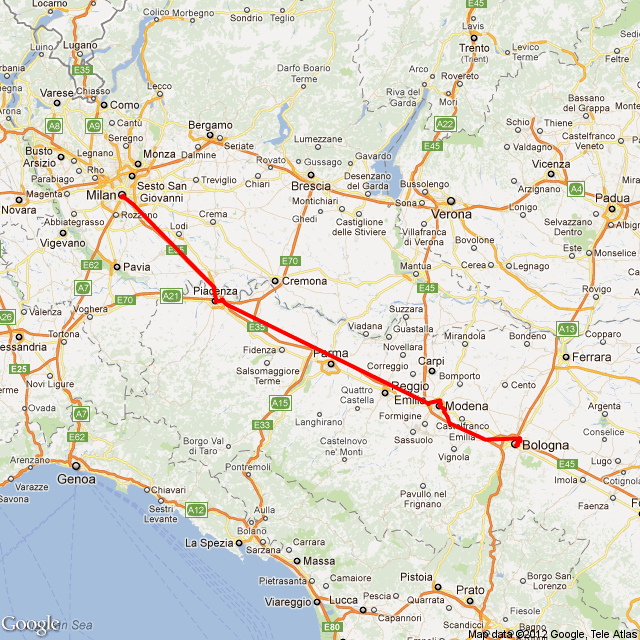
4th method: Image route from addresses origin and destination, and eventually some waypoints:
Once created the project structure, under the src/main/webapp folder we will find the standard web application deployment descriptor WEB-INF/web.xml which defines a Spring-WS MessageDispatcherServlet and maps all incoming requests to this servlet.

There's another configuration file that we need to create: it is the pom.xml that is the Maven configuration file used to list the dependencies of the application and information such as the build process. Follows my pom.xml:
The Endpoint
In Spring WS, we need to implement Endpoints to handle incoming XML requests. It is created by annotating the class with the @Endpoint annotation and it has one or more methods to handle the incoming requests each related to a Web Service method.
Before creating the Endpoint class I have used JAX-B to create the Java classes related to the XSD types I have defined earlier for the requests and responses.
The command to be used to generate the classes is: xjc SchemaFile.xsd.
Follows my web service endpoint:
package com.faeddalberto.googlews.endpoint;

@Endpoint
public class GoogleServicesEndpoint {

    private GoogleServices service;

    @Autowired
    public GoogleServicesEndpoint(GoogleServices service) {
        this.service = service;
    }

    @PayloadRoot(localPart="ImageFromCoordinatesRequest",
        namespace="http://www.faeddalberto.com/GoogleServicesContracts/types")
    public GoogleServicesResponse getImageFromCoordinates(
            ImageFromCoordinatesRequest aRequest){

        return service.getImageFromCoordinates(aRequest);
    }

    @PayloadRoot(localPart="ImageFromAddressRequest",
        namespace="http://www.faeddalberto.com/GoogleServicesContracts/types")
    public GoogleServicesResponse getImageFromAddress(
            ImageFromAddressRequest aRequest){

        return service.getImageFromAddress(aRequest);
    }

    @PayloadRoot(localPart="ImageRouteFromCoordinatesRequest",
        namespace="http://www.faeddalberto.com/GoogleServicesContracts/types")
    public GoogleServicesResponse getImageRouteFromCoordinates(
            ImageRouteFromCoordinatesRequest aRequest){

        return service.getImageRouteFromCoordinates(aRequest);
    }

    @PayloadRoot(localPart="ImageRouteFromAddressesRequest",
        namespace="http://www.faeddalberto.com/GoogleServicesContracts/types")
    public GoogleServicesResponse getImageRouteFromAddresses(
            ImageRouteFromAddressesRequest aRequest){

        return service.getImageRouteFromAddresses(aRequest);
    }
}
This Endpoint class, annotated with the @Endpoint annotation, has a constructor to which is injected the Web Service Implementation Bean as I showed you in the Spring configuration file.
The @PayloadRoot annotations tells Spring WS that the methods are suitable for handling XML messages.
This annotation uses some attributes: the localpart attribute that defines which is the request that the method handles and the namespace attribute that defines the namespace which the request is related to. The four methods declared in the Endpoint class call the four web service methods and all four get a different request as argument that are the classes defined by the JAX-B APIs from the XSD.
All the methods return the same response that is the response of the web service: an image related to the request or an error message if any error has occurred in the web service.
Implementing the Web Service
Let's now give a look at the Java code to implement the Web Service. As usual we have the Interface that declares the service operations and the Service Implementation Bean that implements these operations.
Follows the web service interface:
package com.faeddalberto.googlews.service;

public interface GoogleServices {

    public GoogleServicesResponse getImageFromCoordinates(
ImageFromCoordinatesRequest request);

    public GoogleServicesResponse getImageFromAddress(
        ImageFromAddressRequest request);

    public GoogleServicesResponse getImageRouteFromCoordinates(
        ImageRouteFromCoordinatesRequest request);

    public GoogleServicesResponse getImageRouteFromAddresses(
        ImageRouteFromAddressesRequest request);

}
The Web Service Interface has four methods declared that are the methods the Web Service Implementation Bean implements:
package com.faeddalberto.googlews.service;

public class GoogleServicesImpl implements GoogleServices {

    private static final String SENSOR = "sensor=true";
    private static final String QUESTION_MARK = "?";
    private static final String AMPERSAND = "&";
    private static final String PIPE = "|";

    private String directionUrl;
    private String staticUrl;

    private String mapType;
    private String zoom;
    private String size;
    private String path;
    private String markers;

    private String center;
    private String origin;
    private String destination;
    private String wayPoints;

    public GoogleServicesResponse getImageFromCoordinates(
            ImageFromCoordinatesRequest request) {

        System.out.println("getImageFromCoordinates");

        GoogleServicesResponse response = new GoogleServicesResponse();

        center += request.getLatitude() + "," + request.getLongitude();
        markers += request.getLatitude() + "," + request.getLongitude();

        staticUrl += QUESTION_MARK + size + AMPERSAND + zoom +
            AMPERSAND + center + AMPERSAND + markers + AMPERSAND +
                mapType + AMPERSAND + SENSOR;

        byte[] imageBytes = null;
        try {
            imageBytes = HttpUtils.loadByteArrayImageFromHttp(staticUrl);
        } catch (IOException e) {
            System.err.println("IOException " + e.getMessage());
            response.setErrorDescription("An error has
                occurred while creating the image");
        }

        response.setImage(imageBytes);

        return response;
    }


    public GoogleServicesResponse getImageFromAddress(
            ImageFromAddressRequest request) {

        System.out.println("getImageFromAddress");

        GoogleServicesResponse response = new GoogleServicesResponse();

        center += request.getAddress().replace(" ", "+");

        staticUrl += QUESTION_MARK + size + AMPERSAND + zoom +
            AMPERSAND + center + AMPERSAND +
                mapType + AMPERSAND + SENSOR;

        byte[] imageBytes = null;
        try {
            imageBytes = HttpUtils.loadByteArrayImageFromHttp(staticUrl);
        } catch (IOException e) {
            System.err.println("IOException " + e.getMessage());
            response.setErrorDescription("An error has occurred
                while creating the image");
        }

        response.setImage(imageBytes);

        return response;
    }


    public GoogleServicesResponse getImageRouteFromCoordinates(
            ImageRouteFromCoordinatesRequest request) {

        System.out.println("getImageRouteFromCoordinates");
        GoogleServicesResponse response = new GoogleServicesResponse();

        origin += request.getLatitudeOrg() +
                        "," + request.getLongitudeOrg();
        destination += request.getLatitudeDst() +
                        "," + request.getLongitudeDst();

        directionUrl += QUESTION_MARK + origin + AMPERSAND
            + destination + AMPERSAND + SENSOR;

        try {
            response.setImage(getImageRoute());
        } catch (MalformedURLException e) {
            System.err.println("MalformedURLException " + e.getMessage());
            response.setErrorDescription("An error has occurred
                while processing the request");
        } catch (IOException e) {
            System.err.println("IOException " + e.getMessage());
            response.setErrorDescription("An error has occurred
                while creating the image containing the route");
        }

        return response;
    }


    public GoogleServicesResponse getImageRouteFromAddresses(
            ImageRouteFromAddressesRequest request) {

        GoogleServicesResponse response = new GoogleServicesResponse();

        System.out.println("getImageRouteFromAddresses");

        origin += request.getAddressOrg();
        destination += request.getAddressDst();

        for(int i = 0; i < request.getWaypoints().size(); i++) {
            if (i != 0) wayPoints += PIPE;
            wayPoints += request.getWaypoints().get(i).replace(" ", "+");
        }

        directionUrl += QUESTION_MARK + origin + AMPERSAND +
            destination + AMPERSAND + wayPoints + AMPERSAND + SENSOR;

        try {
            response.setImage(getImageRoute());
        } catch (MalformedURLException e) {
            System.err.println("MalformedURLException " + e.getMessage());
            response.setErrorDescription("An error has occurred
                    while processing the request");
        } catch (IOException e) {
            System.err.println("IOException " + e.getMessage());
            response.setErrorDescription("An error has occurred
                    while creating the image containing the route");
        }

        return response;
    }


    private byte[] getImageRoute()
            throws MalformedURLException, IOException {

        System.out.println(directionUrl);

        String xmlString =
               HttpUtils.loadStringXmlFromHttp(directionUrl);

        Document xmlDocumentResult =
               XmlUtils.createXmlDocumentFromString(xmlString);

        String routeCoord =
               XmlUtils.getRouteCoordinatesFromXml(xmlDocumentResult);

        staticUrl += QUESTION_MARK + size + AMPERSAND
                  + path + routeCoord + AMPERSAND + SENSOR;

        byte[] imageBytes = null;

        imageBytes = HttpUtils.loadByteArrayImageFromHttp(staticUrl);

        return imageBytes;
    }


             /* GETTERS & SETTERS */

    public String getDirectionUrl() {
        return directionUrl;
    }


    public void setDirectionUrl(String directionUrl) {
        this.directionUrl = directionUrl;
    }


    public String getStaticUrl() {
        return staticUrl;
    }


    public void setStaticUrl(String staticUrl) {
        this.staticUrl = staticUrl;
    }


    public String getMapType() {
        return mapType;
    }


    public void setMapType(String mapType) {
        this.mapType = mapType;
    }


    public String getZoom() {
        return zoom;
    }


    public void setZoom(String zoom) {
        this.zoom = zoom;
    }


    public String getSize() {
        return size;
    }


    public void setSize(String size) {
        this.size = size;
    }


    public String getPath() {
        return path;
    }


    public void setPath(String path) {
        this.path = path;
    }


    public String getMarkers() {
        return markers;
    }


    public void setMarkers(String markers) {
        this.markers = markers;
    }


    public String getCenter() {
        return center;
    }


    public void setCenter(String center) {
        this.center = center;
    }


    public String getOrigin() {
        return origin;
    }


    public void setOrigin(String origin) {
        this.origin = origin;
    }


    public String getDestination() {
        return destination;
    }


    public void setDestination(String destination) {
        this.destination = destination;
    }


    public String getWayPoints() {
        return wayPoints;
    }


    public void setWayPoints(String wayPoints) {
        this.wayPoints = wayPoints;
    }
}
The Web Service Implementation bean has some constants and some instance variables with default values injected by the Spring context configuration file.The implemented methods, after reading the request values make use of two classes, HttpUtils and XmlUtils, that I've implemented to call the Google Services using the HttpConnection, Stream, and XML related APIs to parse the response of the Google services.
These are the two utils classes that I am talking about:
The util class related to Http:
package com.faeddalberto.googlews.utils;

public class HttpUtils {

    public static String loadStringXmlFromHttp(
            String urlString) throws IOException, MalformedURLException {

        URL url = null;
        BufferedReader reader = null;
        StringBuilder stringBuilder = null;

        try {
            url = new URL(urlString);

            HttpURLConnection connection = (HttpURLConnection) url.openConnection();

            // just want to do an HTTP GET here
            connection.setRequestMethod("GET");
            connection.setDoOutput(true);
            connection.connect();

            // read the output from the server
            reader = new BufferedReader(
                 new InputStreamReader(connection.getInputStream()));
            stringBuilder = new StringBuilder();

            String line = null;
            while ((line = reader.readLine()) != null) {
                stringBuilder.append(line + "\n");
                System.out.println(line);
            }

        } finally {

            // close the reader; this can throw an exception too, so
            // wrap it in another try/catch block.
            if (reader != null)   {
                try {
                    reader.close();
                }  catch (IOException ioe) {
                    System.err.println("IOException " + ioe.getMessage());
                }
            }
        }

        return stringBuilder.toString();
    }

    public static byte[] loadByteArrayImageFromHttp(String urlString) throws IOException {

        URL url = new URL(urlString); //Get an input stream for reading

        HttpURLConnection hc = null;
        hc = (HttpURLConnection) url.openConnection();
        hc.setRequestMethod("GET");
        hc.setDoOutput(true);
        hc.connect();

        InputStream in = new BufferedInputStream(hc.getInputStream());

        try {
            ByteArrayOutputStream bout = new ByteArrayOutputStream(10000);
            int b;
            while ((b = in.read()) != -1) {
                bout.write(b);
            }

            return bout.toByteArray();
        } finally {
            in.close();
        }
    }

}
The util class related to XML:
package com.faeddalberto.googlews.utils;

public class XmlUtils {

    public static Document createXmlDocumentFromString(String result) {

        DocumentBuilderFactory factory = DocumentBuilderFactory.newInstance();
        InputSource source = new InputSource(new StringReader(result));

        Document document = null;

        try {
            document = factory.newDocumentBuilder().parse(source);
        } catch (SAXException e) {
            System.err.println("SAXException " + e.getMessage());
        } catch (IOException e) {
            System.err.println("IOException " + e.getMessage());
        } catch (ParserConfigurationException e) {
            System.err.println("ParserConfigurationException " + e.getMessage());
        }

        return document;
    }


    public static String getRouteCoordinatesFromXml(Document xmlDocumentResult) {

        String lat = null, lng = null, route = "";

        NodeList nList = xmlDocumentResult.getElementsByTagName("step");

        for (int temp = 0; temp < nList.getLength(); temp++) {
            Node nNode = nList.item(temp);
            if (nNode.getNodeType() == Node.ELEMENT_NODE) {

                Element eElement = (Element) nNode;

                System.out.println("LAT: " + getTagValue("lat", eElement));
                System.out.println("LONG: " + getTagValue("lng", eElement));

                lat = getTagValue("lat", eElement);
                lng = getTagValue("lng", eElement);
            }

            route += "|" + lat + "," + lng;
        }

        return route;
    }

    private static String getTagValue(String sTag, Element eElement) {

        NodeList nlList =
             eElement.getElementsByTagName(sTag).item(0).getChildNodes();

        Node nValue = (Node) nlList.item(0);

        return nValue.getNodeValue();
    }

}
Next picture shows the browser with the resulting WSDL of the service calling http://127.0.0.1:8080/googlews/googleservices.wsdl. In the picture below we can only see the first part of the WSDL, containing the types associated with the service: 
The next thing I want to show you are the tests of the different web service operations and the images resulting from the calls. I have used jUnit to test the service methods:
1st method: Image from coordinates:
@Test
@DirtiesContext
public void getImageFromCoordinatesTest() throws IOException {

    GoogleServices services =
               (GoogleServices) applicationContext.getBean("services");

    ImageFromCoordinatesRequest request = new ImageFromCoordinatesRequest();
    request.setLatitude(40.711614);
    request.setLongitude(-74.012318);

    String fileName = "lat " + request.getLatitude() +
                      " lon " + request.getLongitude();

    GoogleServicesResponse response = services.getImageFromCoordinates(request);

    Assert.assertNotNull(response.getImage());

    if (response.getImage() != null)
         createImageOnDisk(response.getImage(), fileName);
    else System.out.println(response.getErrorDescription());
}

2nd method: Image from address:
@Test
@DirtiesContext
public void getImageFromAddressTest() throws IOException {

    GoogleServices services =
         (GoogleServices) applicationContext.getBean("services");

    ImageFromAddressRequest request = new ImageFromAddressRequest();
    request.setAddress("Piccadilly Circus, London, UK");

    String fileName = request.getAddress().replace(',', ' ');

    GoogleServicesResponse response = services.getImageFromAddress(request);

    Assert.assertNotNull(response.getImage());

    if (response.getImage() != null)
         createImageOnDisk(response.getImage(), fileName);
    else System.out.println(response.getErrorDescription());
}

3rd method: Image route from coordinates origin and destination:
@Test
@DirtiesContext
public void getImageRouteFromCoordinatesTest() throws IOException {

    GoogleServices services =
          (GoogleServices) applicationContext.getBean("services");

    ImageRouteFromCoordinatesRequest request =
            new ImageRouteFromCoordinatesRequest();
    request.setLatitudeOrg(37.4219720);
    request.setLongitudeOrg(-122.0841430);
    request.setLatitudeDst(37.4163228);
    request.setLongitudeDst(-122.0250403);

    String fileName = "latOrg " + request.getLatitudeOrg() +
                      " lonOrg " + request.getLongitudeOrg() +
                      "latDst " + request.getLatitudeDst() +
                      " lonDst " + request.getLongitudeDst();

    GoogleServicesResponse response =
         services.getImageRouteFromCoordinates(request);

    Assert.assertNotNull(response.getImage());

    if (response.getImage() != null)
        createImageOnDisk(response.getImage(), fileName);
    else System.out.println(response.getErrorDescription());
}

4th method: Image route from addresses origin and destination, and eventually some waypoints:
@Test
@DirtiesContext
public void getImageRouteFromAddressesTest() throws IOException {

    GoogleServices services =
               (GoogleServices) applicationContext.getBean("services");

    ImageRouteFromAddressesRequest request =
          new ImageRouteFromAddressesRequest();
    request.setAddressOrg("Milano,MI");
    request.setAddressDst("Bologna,BO");

    List wayPoints = new ArrayList();
    wayPoints.add("Piacenza, PC");
    wayPoints.add("Modena, MO");
    request.setWaypoints(wayPoints);

    String fileName = request.getAddressOrg().replace(',', ' ')
            + " - " + request.getAddressDst().replace(',', ' ');

    GoogleServicesResponse response =
               services.getImageRouteFromAddresses(request);

    Assert.assertNotNull(response.getImage());

    if (response.getImage() != null)
        createImageOnDisk(response.getImage(), fileName);
    else System.out.println(response.getErrorDescription());
}


